How to read this
Our answers, and your questions.
If you've run your chamber on GrowthZone (ChamberMaster) for years, you know it better than we do. So we won't fill a column with claims about it.
Instead, each row below is a question we think every director should put to a vendor. Our column says exactly what Chamberly does. The other column is what to ask your current vendor. Put the two answers side by side and decide.
Side by side
Ten questions to ask any vendor.
- 01
Can I see what every payment costs me?
Chamberly
Yes. Every online payment shows four figures: what the member paid, Stripe's fee, Chamberly's fee and what reached your account. They're marked estimated until Stripe confirms the real numbers. A refund returns our fee by default.
Ask GrowthZone (ChamberMaster)
Ask for one payment, broken down: processor fee, vendor fee and net, on the payment itself rather than in a monthly total.
- 02
Does it work without online payments?
Chamberly
Fully. Cash, cheque, bank transfer and waived are first-class payments, recorded against sequential invoices, and Chamberly never takes a cut of any payment. Connect Stripe when you want members to pay online, or never.
Ask GrowthZone (ChamberMaster)
Ask what changes, and what it costs, if most of your dues still arrive by cheque.
- 03
Whose account does the money land in?
Chamberly
Yours. Online payments run through your chamber's own Stripe account via Stripe Connect, by card or bank. Payouts go straight to you.
Ask GrowthZone (ChamberMaster)
Ask whose merchant account processes your payments, and how long funds take to reach your bank.
- 04
Can my board see churn and lapse honestly?
Chamberly
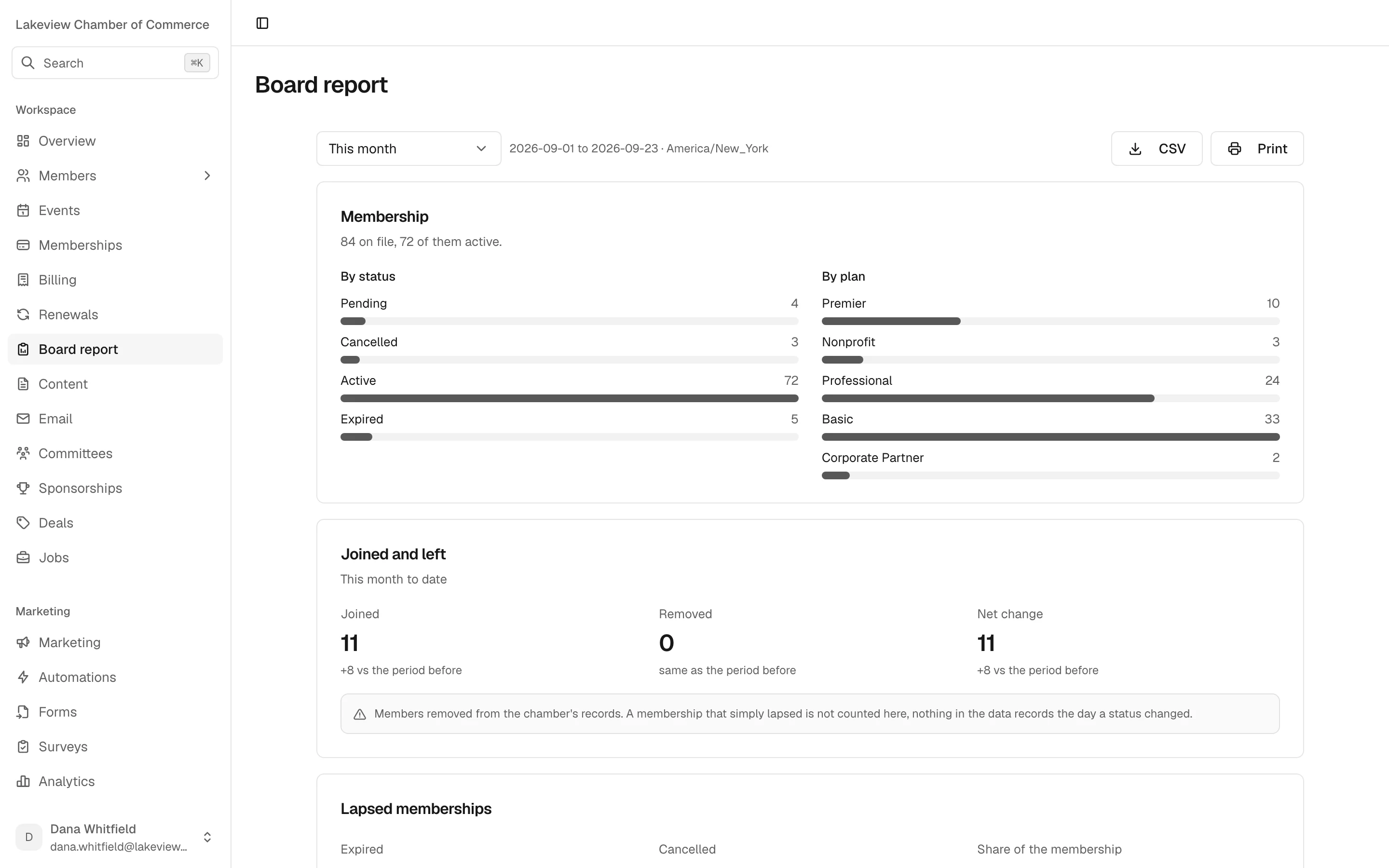
The board report shows joins and leaves, a lapse rate labelled as a snapshot rather than churn, committed and collected revenue, and upcoming renewals, each against the previous period. Where a number is weaker than it looks, a caveat is printed beside it.
Ask GrowthZone (ChamberMaster)
Ask how the churn figure on your board slide is calculated, and what it leaves out.
- 05
Is my data in its own database?
Chamberly
Yes. Each chamber runs on its own instance with its own database. No tables are shared with other chambers. Chamberly hosts and runs it.
Ask GrowthZone (ChamberMaster)
Ask whether your records sit in a database of their own or alongside other organizations' data.
- 06
Who builds my website?
Chamberly
We do, on every plan. We design a new site for your chamber and connect it to Chamberly, so events, the directory, the blog and sign-up forms stay current. Or your agency builds on our REST API.
Ask GrowthZone (ChamberMaster)
Ask whether the website is part of your subscription or a separate project, and who you call to change it.
- 07
Can a table of eight be sold twice?
Chamberly
No. Capacity is counted in seats, so a table of eight uses eight. A paid seat is held for 30 minutes pending payment and confirmed by a Stripe payment or a cheque your staff record. It is never sold twice.
Ask GrowthZone (ChamberMaster)
Ask what happens when two people buy the last table at the same moment, or a card payment fails halfway.
- 08
What do renewals send, and when?
Chamberly
Reminders 30, 14, 7 and 1 days before the due date at 9am your time, an invoice on the day, a grace period, follow-ups, then expiry. All of it is configurable, and it stays off until you turn it on. A newsletter unsubscribe never stops a renewal notice.
Ask GrowthZone (ChamberMaster)
Ask for the exact renewal schedule your account runs today, and whether an unsubscribe silences dues notices.
- 09
What does my accountant get?
Chamberly
Balanced double-entry journal entries as a CSV for QuickBooks, cash or accrual, with your own account codes and sponsorship revenue on its own line. If the entries don't balance, Chamberly won't build the file. It's an export, not a live sync.
Ask GrowthZone (ChamberMaster)
Ask your treasurer or accountant what they receive today, and how long month-end takes them.
- 10
What will it cost, and what isn't included?
Chamberly
One flat monthly price by chamber size: $199 up to 150 active members, $329 up to 400, $479 up to 1,000, from $699 above that. No setup fee, no per-seat fees, and no cut of your payments: members pay, Stripe keeps its standard fee, the rest is yours. Every plan includes the whole product, your new website and migration.
Ask GrowthZone (ChamberMaster)
Ask for your total annual cost in writing: subscription, add-ons, website, payment fees and any renewal increase.
Chamberly's answers describe the product as it ships today. Prices are per month in US dollars; Stripe's own processing fee is separate. See pricing for the full math. If you think we've described anything unfairly, write to [email protected].
What your board sees
Numbers that say what they are.
Any date range, compared with the period before, printable for the board packet and exportable as CSV. Where the data can't support a stronger claim, the report says so on the page.
What your treasurer sees
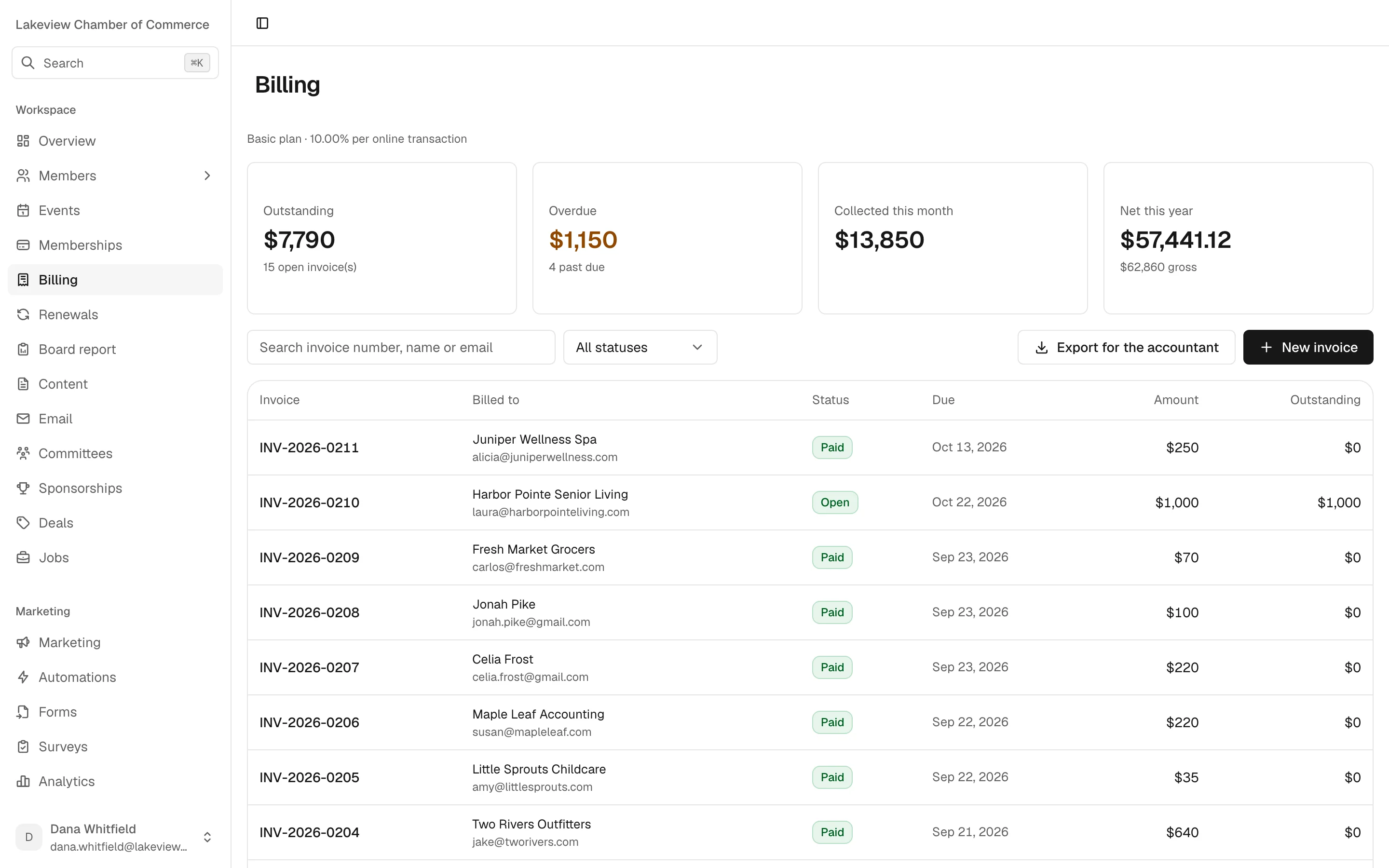
One ledger for every way dues arrive.
Sequential invoices, outstanding and overdue at a glance, and an export for the accountant one click away. Cheques and transfers sit in the same list as card payments.
Where GrowthZone may still fit better
If these matter most, stay put for now.
These are things Chamberly doesn't do today. If your chamber depends on one of them and your current system handles it, switching would cost you more than it saves.
- 01
You issue certificates of origin
Chamberly doesn't. If export documentation is part of your chamber's work and your current system handles it, that's a real reason to stay.
- 02
You want the general ledger inside your chamber software
Chamberly has no built-in general ledger. We feed QuickBooks with balanced journal entries and leave the books to your accountant.
- 03
You send text messages to members
Chamberly doesn't send SMS. Email, the member portal and your website are the channels today.
- 04
You rely on cards being charged automatically at renewal
Members can save a card in the portal and pay an invoice online, but Chamberly doesn't charge it automatically when dues come round.
- 05
You run recurring events or plan from a calendar view
Each event is created on its own, and events are listed rather than laid out on a month calendar.
- 06
You want a vendor with a long track record
Chamberly was founded in 2026. We don't have customer references to offer yet, which is why the founding program exists. If a long history matters most to your board, weigh that honestly.
Moving over
You send the export. We do the import.
Migration is included on every plan. We map your fields, import with you, and build your new website while we're at it. Renewals stay switched off until you've checked the dates and turned them on.
- 1
Members and their details
Organizations, contacts, statuses, categories and tags, from your GrowthZone (ChamberMaster) export or a spreadsheet. The import reports errors row by row, so nothing disappears silently.
- 2
Membership plans
Your dues levels, billed monthly, quarterly or annually, including plans that come with event tickets.
- 3
Directory listings
Which members are listed and featured, with their categories, so your new website launches with a full directory.
- 4
Anything else, case by case
Tell us what else you need moved and we'll say honestly what's possible before you commit. There is no automated migration tool: we do this with you, as a service.
GrowthZone (ChamberMaster)
Questions from directors.
Something not covered here? Ask us on the demo, or write to [email protected].
Are GrowthZone and ChamberMaster two different vendors?
No. ChamberMaster is the long-running chamber product of the company now called GrowthZone. If both names are on your shortlist, that's one vendor, not two.
Why don't you list GrowthZone's prices and features on this page?
Because we can't verify them for your contract, and they change. We'd rather give you the questions to ask and our own answers in writing, so you can compare like for like.
What do you move from GrowthZone (ChamberMaster)?
Your members and their details, membership plans and directory listings, from an export or a spreadsheet. We map the fields and import with you. For anything else, we'll tell you honestly what's possible.
How long does a switch take?
It depends on how clean your export is, how many plans you run and how quickly your website content comes together. We'll give you a plan for your chamber on the demo rather than a number on a web page.
Can we keep QuickBooks?
Yes. Chamberly exports balanced journal entries your accountant imports into QuickBooks. It's an export, not a live sync.
What does Chamberly not do yet?
Certificates of origin, a built-in general ledger, SMS, automatic card charging on renewal and recurring events. If one of those is a deal-breaker, say so on the demo.
What happens to our data if we leave Chamberly?
It's yours. You leave with an export of your data, at no charge.