Chamber of commerce software

Chamber of commerce software for the whole week.

Members, dues, renewals, events, sponsors and the board report in one calm system, built for how a chamber actually runs. We build your new website on top of it, and we move your data in.

One system, not six

A chamber isn't a CRM with a newsletter bolted on.

It's dues on three schedules, a gala that sells tables of eight, sponsors who were promised a logo on the banner, a treasurer who wants the numbers to tie, and a board that meets on Thursday.

Chamber of commerce software should know all of that without a consultant configuring it. Chamberly does, because it was built for chambers from the first screen.

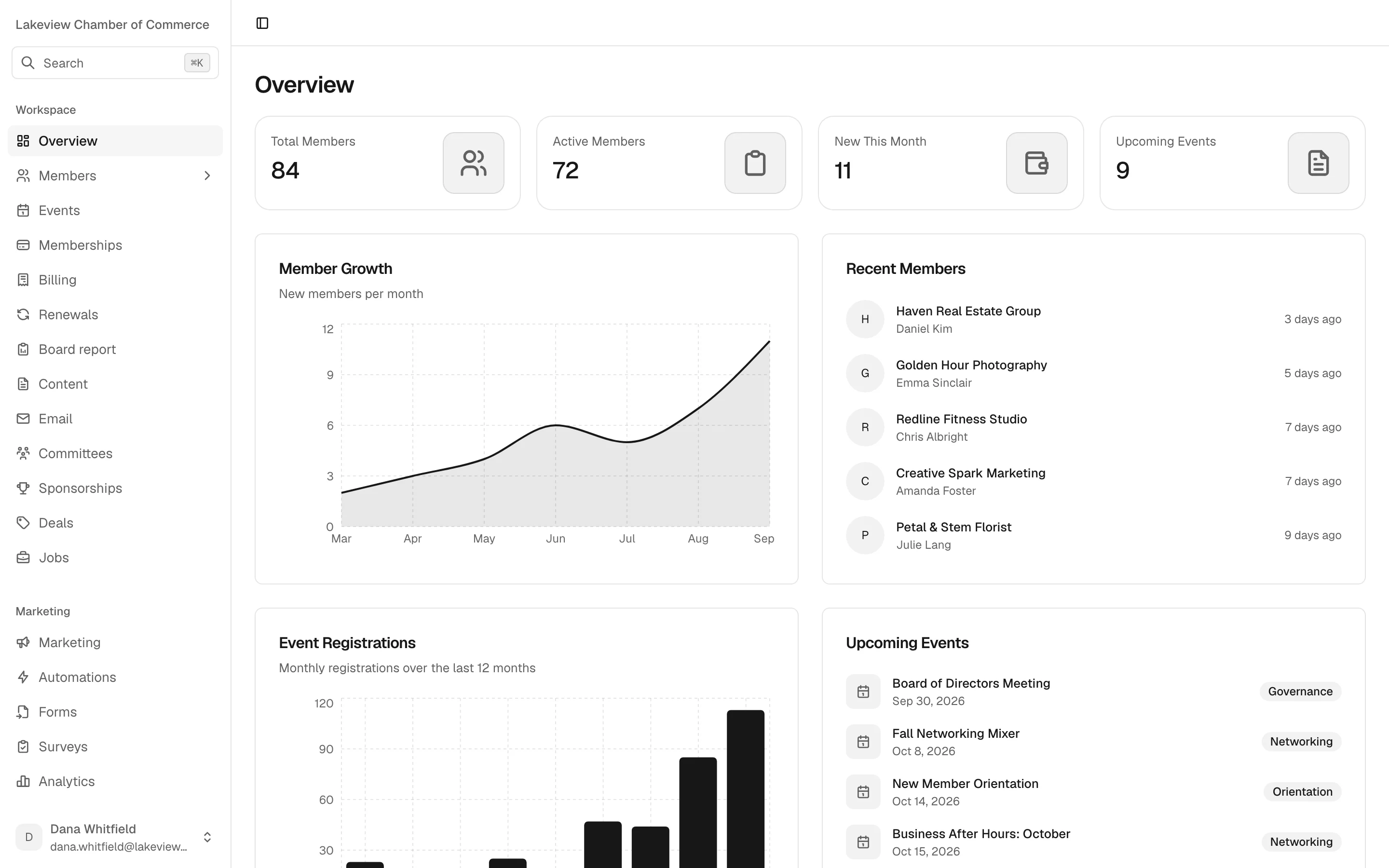
The Chamberly overview for Lakeview Chamber of Commerce: total, active and new members, upcoming events, a member growth chart, recent members and the next events on the calendar
The overview a director opens each morning. Real product, demo chamber.

A week at the chamber

Five days, five screens.

What an ordinary week looks like when the membership, the money and the events share one database.

01 Monday

Dues, invoices and the cheques in the drawer.

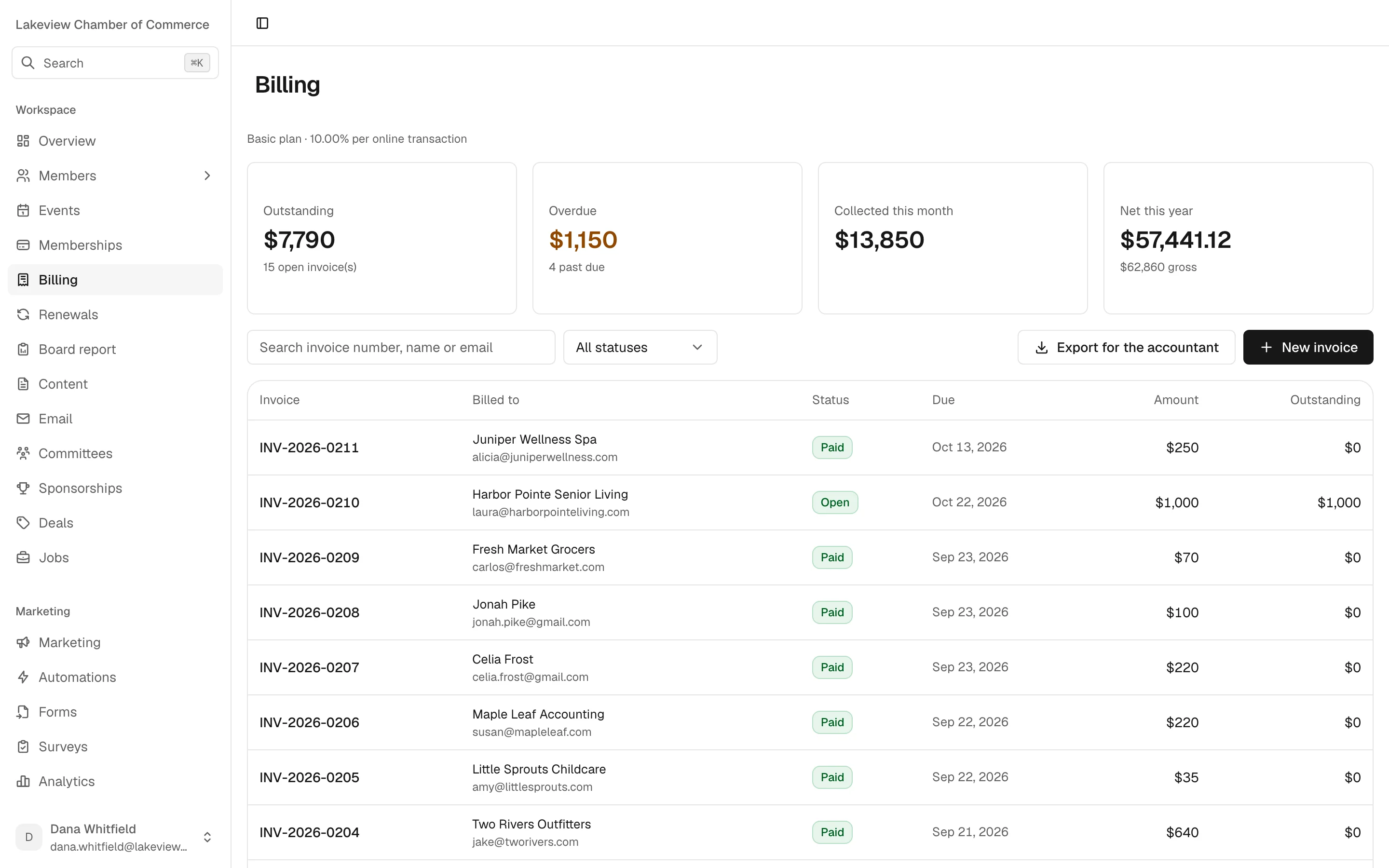
Every invoice gets a sequential number. Cheques, cash, bank transfers and waived dues are recorded as payments in their own right, not as exceptions. Online payments land in your chamber's own Stripe account, and each one shows what the member paid, what Stripe kept, and what reached you. Chamberly takes no cut.

  • Works fully without Stripe
  • No Chamberly cut on any payment
  • Month-end journal entries for QuickBooks, balanced or not exported
The Chamberly billing screen for Lakeview Chamber of Commerce, showing outstanding, overdue and collected totals above a list of numbered invoices marked paid or open

02 Tuesday

A ribbon cutting, a mixer and the gala, on one list.

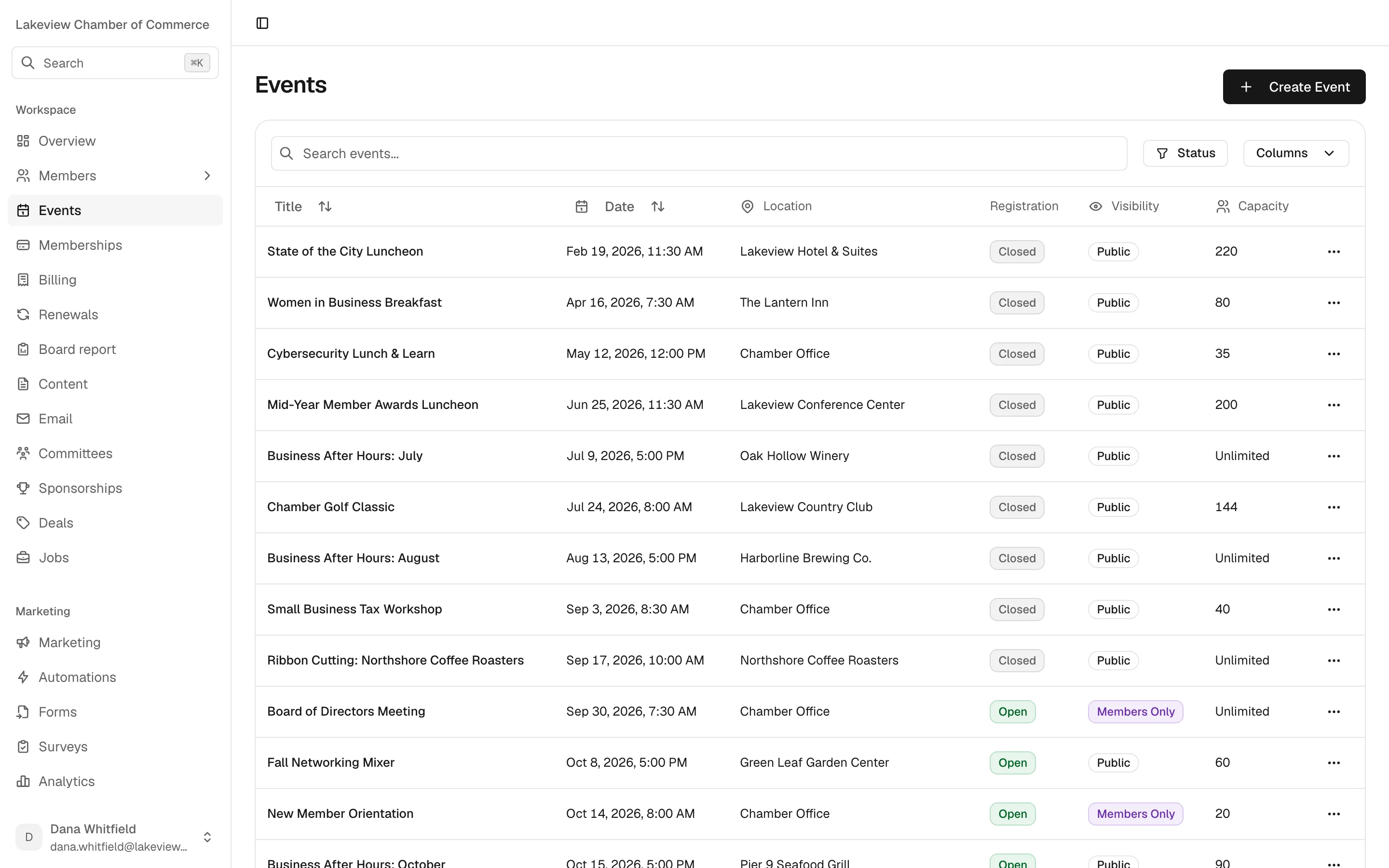
Public and members-only events side by side, with registration status and capacity at a glance. Each event can sell several packages, a member ticket, a table of eight, a sponsor table, and capacity is counted in seats so a table takes eight.

  • Hosted sign-up page with your logo and colour
  • Waitlist, check-in and cancellation per registration
  • Plans can include events, so Premier members get in free
The events list in Chamberly with a State of the City luncheon, Business After Hours mixers, a golf classic, a ribbon cutting and members-only board meetings, each with registration status, visibility and capacity

03 Wednesday

The sponsor call you can take with confidence.

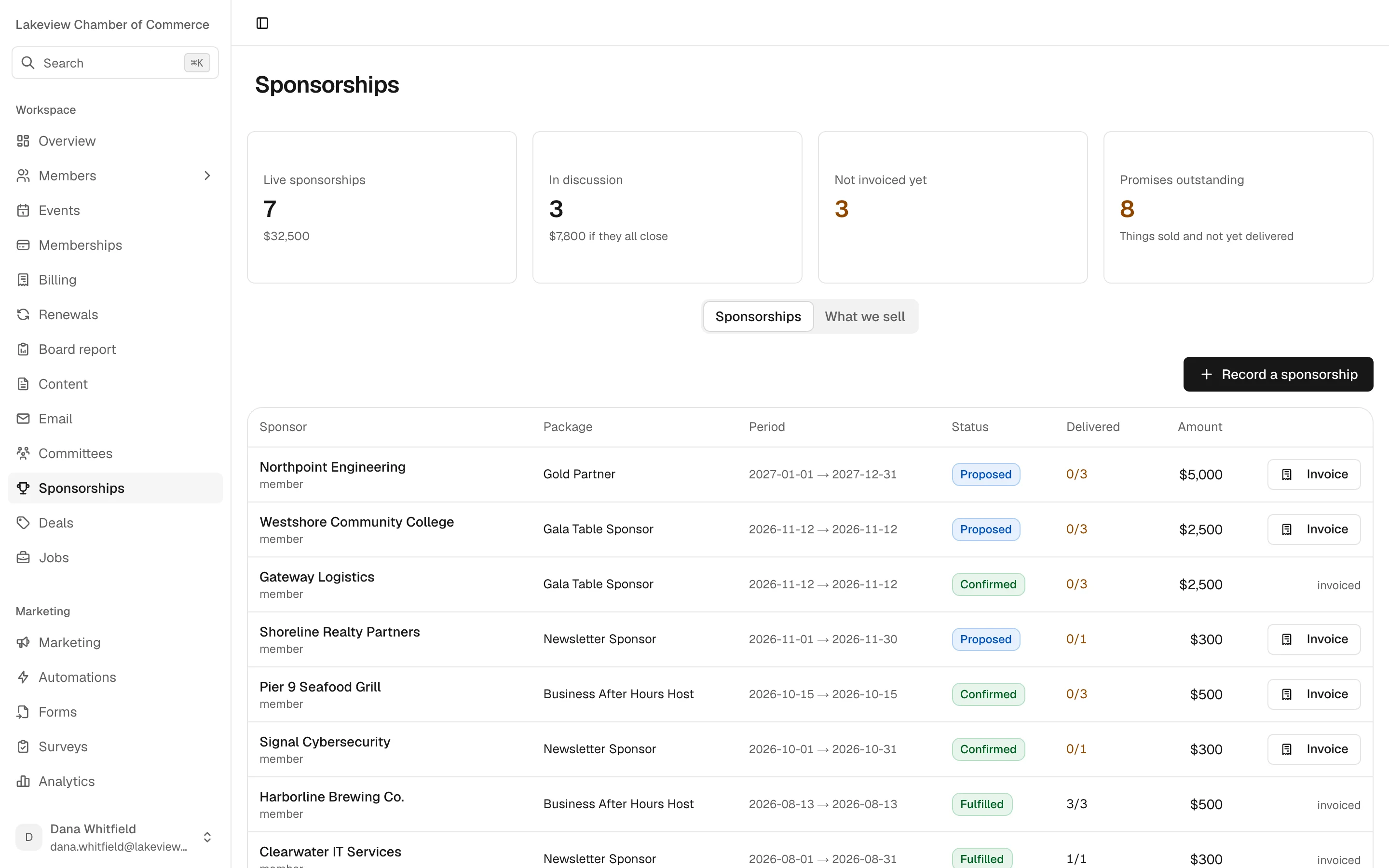
Sponsorship packages have a limited number of slots per period, and a proposal doesn't use one up until it's sold. When it sells, the package's benefits are copied onto the sale as a checklist, so you can see every logo, table and newsletter mention you still owe.

  • Sponsors don't have to be members
  • Invoiced through the same ledger as dues
  • A count of promises still outstanding
The sponsorships screen with live and proposed sponsorships, delivery progress for each, and a count of promises outstanding

04 Thursday

Board night, with numbers you can stand behind.

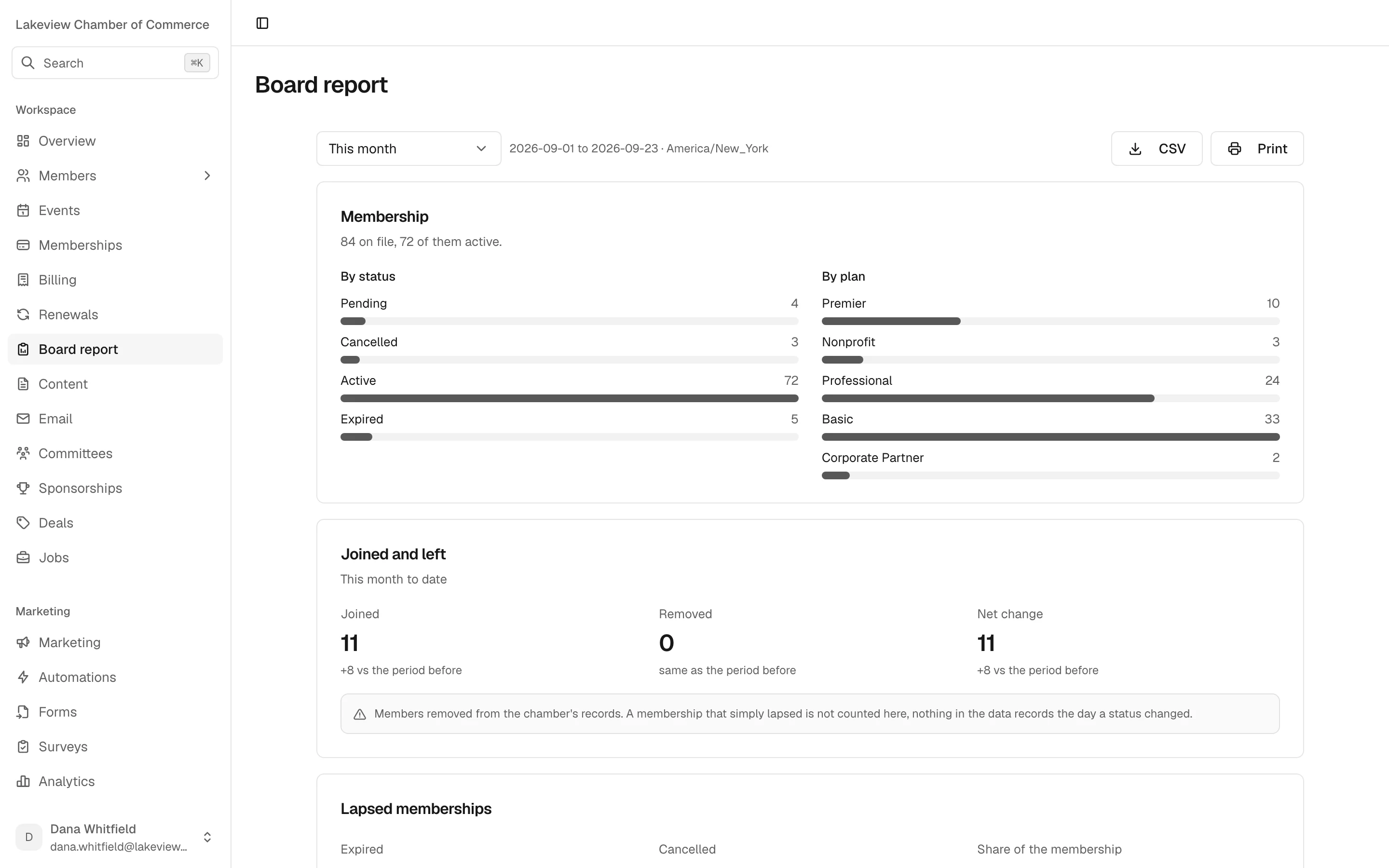
Membership mix, joins and leaves, lapse rate, committed and collected revenue, upcoming renewals, event attendance and the application pipeline. Each number sits beside the previous period, for any date range you pick. Print it or export the CSV for the board packet.

  • Lapse rate labelled as a snapshot, not churn
  • Fees and outstanding amounts shown, not netted away
  • A caveat printed next to any number that needs one
The board report for this month showing membership by status and by plan, and members joined and removed compared with the period before, with a note explaining what is counted

05 Friday

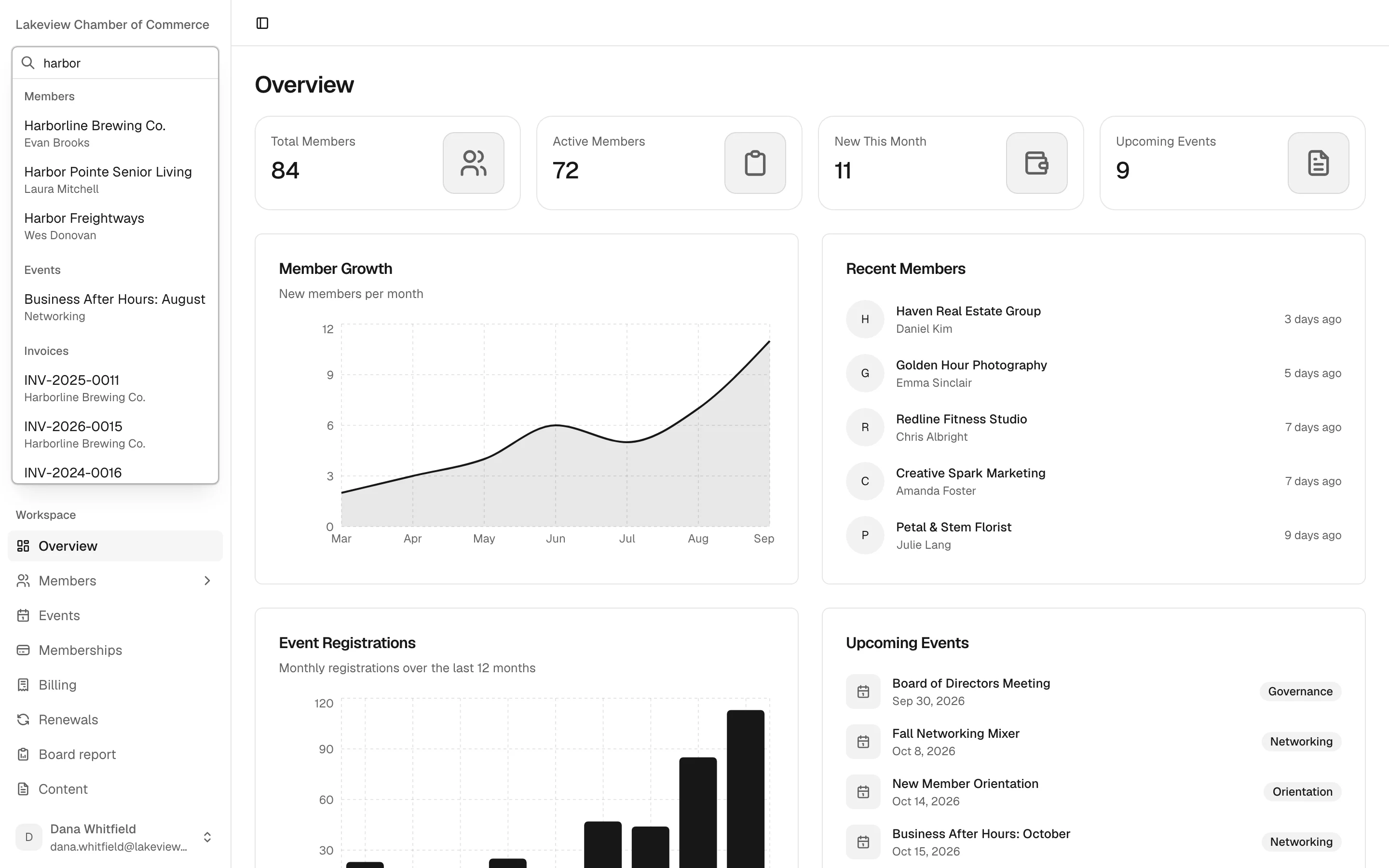
Finding anything in two keystrokes.

Press ⌘K and type part of a name. Chamberly searches fifteen kinds of records at once, so a member, their invoices and the event they hosted come up together. Your staff stop remembering which screen something lives on.

  • Members, events, invoices, sponsorships and more
  • Unlimited staff users, admin and staff roles
  • Deactivating a user ends their sessions at once
The ⌘K search open over the overview, with the query harbor matching three members, a Business After Hours event and several invoices

What's included

Every module, on every plan.

No feature tiers, no per-seat fees and no cut of your payments. Plans differ only by chamber size.

See how pricing works
Members
Statuses, tags, custom fields, notes and a timeline of calls, meetings, payments and events. CSV import that reports errors row by row.
Applications
Join forms on your website. Approving an application creates the member, and staff are emailed when one arrives.
Plans
Monthly, quarterly or annual, with events included where you choose.
Renewals
Reminders, invoice, grace period, follow-ups and expiry on a schedule you control. Off until you turn it on.
Events
Packages with their own price, seats and limits. 30-minute seat holds, waitlists, members-only events, check-in.
Sponsorships
Limited slots per period, benefits tracked as a delivery checklist on every sale.
Billing
Numbered invoices, manual payments, online card and bank payments through your own Stripe account.
Accounting export
Double-entry journal entries for QuickBooks, cash or accrual, with your account codes.
Board report
Eight measures against the previous period, printable, with caveats where they belong.
Email
A block builder with an Outlook-safe preview, scheduled campaigns from your own domain, and delivery analytics.
Automations
Eight triggers, from member joined to tag added, with email, wait and condition steps.
Forms and surveys
Contact forms with nine field types. Surveys with seven question types, NPS and an anonymous option.
Directory, deals and jobs
Listings members update from the portal, and member-submitted deals and jobs that staff approve.
Committees
Standing, ad hoc, advisory and executive, with chairs, secretaries and term dates.
Member portal
Members pay invoices, save a card, see their events and edit their listing.
Website content
Blog, pages and team profiles, served to your website through the API.
How it's built

Your chamber, on its own instance.

The details that decide whether software can be trusted with a chamber's members and money. None of them are settings you have to find.

  1. 01

    One database per chamber

    Each chamber gets its own instance and its own database. No shared tables with anyone else. Hosted and run by us.

  2. 02

    On your chamber's clock

    Reminders, reports and listing expiry follow your time zone, not a server's. A deal ends at the end of your day.

  3. 03

    A record of every change

    The activity log shows who changed what, with the old value struck through. Money and permission changes are kept for seven years.

  4. 04

    Open, with care

    A REST API with scoped, revocable, expiring keys, and an MCP server for AI coding tools that never serves member records.

Included on every plan

We build the website. We move the data.

The two jobs that usually stall a switch, done by us rather than handed back to you.

A new chamber website

Designed for your chamber and built on Chamberly's API, so events, the directory, the blog and join forms stay current without anyone copying them over. Already have an agency? They can build on the same API.

Your members, moved in

Send us an export from GrowthZone (ChamberMaster), MemberClicks or a spreadsheet. We map the fields and import your members, plans and directory with you. It's a service we do, not a button you press.

Switching from GrowthZone

Not yet

What Chamberly doesn't do yet.

Chamberly is new. If one of these is a deal-breaker, better to know now than after the migration.

  • Certificates of origin

    Not built. Chambers that issue them keep their current process.

  • Automatic card charging on renewal

    Members can save a card and pay in the portal, but renewals aren't charged automatically.

  • A general ledger

    Chamberly exports journal entries to QuickBooks rather than replacing it.

  • SMS, recurring events and a calendar view

    Email is the only channel today, and each event is created on its own.

Questions

Chamber software, answered.

Something not covered here? Ask us on the demo, or write to [email protected].

What is chamber of commerce software?

It's the system a chamber runs its membership on: the member records, dues and renewals, events, sponsorships, invoices, the directory and the reports that go to the board. Chamberly puts all of that in one place and builds your public website on top of it.

Is Chamberly only for chambers of commerce?

Yes, it's built for chambers first. The plans, the event packages, the sponsorship checklist and the board report all start from how a chamber works. Other member associations can use it, but we design every screen for chambers.

How long does it take to switch?

It depends on how much history you have and how your current data is shaped. We import your members, plans and directory from a GrowthZone (ChamberMaster) or MemberClicks export or a spreadsheet, and build your website alongside. We'll give you a realistic timeline on the demo once we've seen your export.

Do we have to use your website?

No. We design and build a new site for your chamber on every plan, but if you already work with an agency, they can build on Chamberly's REST API with a key scoped to what the site needs.

Does Chamberly replace QuickBooks?

No, and it isn't trying to. Chamberly keeps the member-side ledger: invoices, payments, fees and refunds. Each month it exports balanced journal entries your accountant imports into QuickBooks. It's an export, not a live sync.

What does it cost?

Every plan includes the whole product, your new website and migration, with unlimited staff users. Plans are one flat monthly price by chamber size, from $199, with no setup fee and no cut of your payments. The pricing page has the details.

Is our data kept separate from other chambers?

Yes. Each chamber runs on its own instance with its own database, hosted and run by Chamberly. Nothing is shared between chambers, and every change is written to an activity log.

See Chamberly with your chamber in it.

Thirty minutes with a founder. Bring your current setup and your hardest week, and we'll show you how it runs here.